
The Importance of Two-Factor Authentication in Online Security
In an era where digital threats are more sophisticated than ever, ensuring the security of your online accounts is paramount. Two-Factor Authentication (2FA) serves as a powerful additional layer of protection that can drastically reduce the risk of unauthorized access. With cyberattacks becoming increasingly common, users must prioritize their online security strategies.
Many users remain unaware of the vulnerabilities their accounts face and how quickly their information can be compromised. Here are some alarming statistics to consider:
- Over 80% of data breaches are caused by compromised credentials, highlighting the importance of robust password management and additional security measures.
- Approximately 2.2 million identities are stolen every year in the United States, showcasing the magnitude of the identity theft issue. This figure is a stark reminder that everyone is a potential target.
- Users are at a higher risk if they do not utilize any form of extra security measures, making it even more crucial to adopt strategies like 2FA.
How Does Two-Factor Authentication Work?
Implementing 2FA can significantly help mitigate these threats. It works by requiring not only a password but also a second factor that serves as confirmation of a user’s identity. This process can involve:
- A text message code sent to your registered mobile number, which you must input alongside your password to gain access to your account.
- An authentication app, such as Google Authenticator or Authy, which generates a time-sensitive code that adds an extra layer of verification.
- A biometric scan, such as a fingerprint or facial recognition, which is increasingly common in mobile devices and enhances the security of personal data.
The Path to Enhanced Security
As we delve deeper into the mechanics of Two-Factor Authentication, it becomes evident that understanding how to leverage this tool effectively is crucial in protecting your personal information and online presence. Most online services now offer or mandate 2FA as a basic security requirement. For example, prominent platforms like Facebook, Google, and banking websites encourage users to enable 2FA to prevent unauthorized access.
Implementing 2FA is a straightforward process that typically involves navigating to your account settings and selecting the security tab. From there, you can enable 2FA and choose your preferred method of authentication. By doing so, not only do you enhance your account security, but you also create a more resilient barrier against potential breaches.
Ultimately, the adoption of Two-Factor Authentication is a proactive step that every user should consider. In a world increasingly defined by digital interactions, protecting one’s online identity is essential not only for individual safety but also for the integrity of data across networks. The peace of mind that comes from knowing your accounts are secure allows users to engage more confidently with the vast digital landscape.
DIVE DEEPER: Click here for more insights
Understanding the Mechanics of Two-Factor Authentication
To appreciate the impact of Two-Factor Authentication (2FA), it’s essential to understand its mechanics and the layers of security it provides. At its core, 2FA drastically reduces the risk of unauthorized access by requiring an additional verification step beyond just a password. This added layer is particularly vital as traditional password security can no longer withstand sophisticated hacking techniques.
A significant aspect of 2FA lies in its versatility. Users can choose from various authentication methods to enhance their security posture. To give you a clearer picture, let’s explore some of the common forms of 2FA:
- Text Message Codes: One of the most common methods, it involves receiving a one-time code via SMS that you must enter alongside your password. While convenient, it’s crucial to note that SMS-based authentication can be vulnerable to interception.
- Authentication Apps: Applications like Google Authenticator or Authy generate time-sensitive codes that are more secure than SMS. These apps don’t rely on network availability, adding another layer of convenience and security.
- Biometric Verification: This method includes fingerprint scans, facial recognition, and voice recognition. As technology evolves, biometric methods are becoming integral to personal and financial security, providing a seamless user experience.
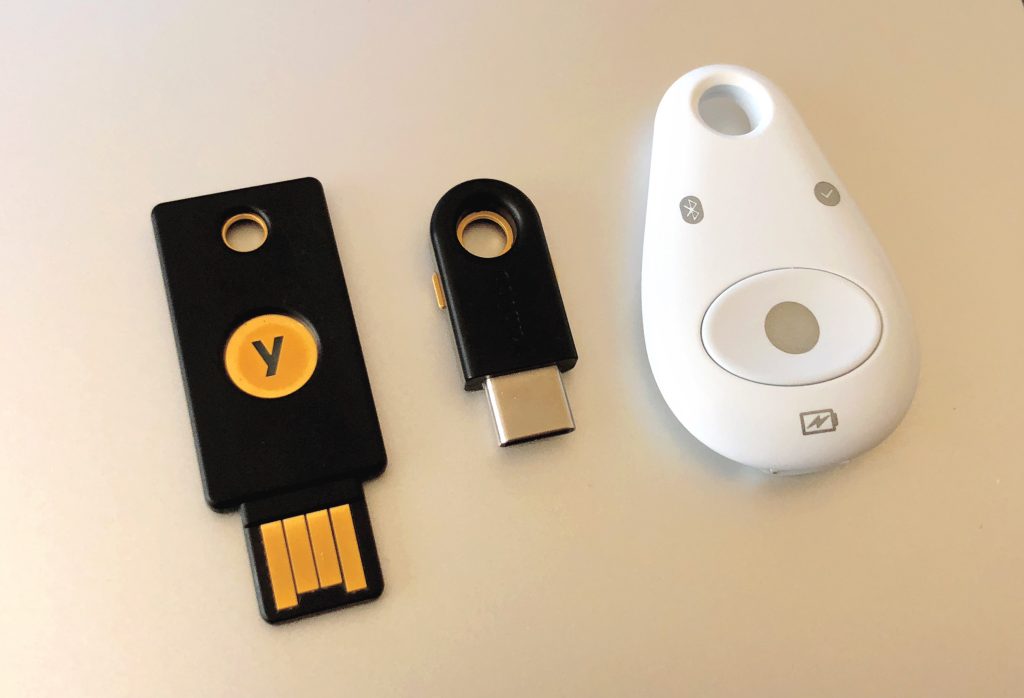
- Hardware Tokens: Devices like YubiKey serve as physical security keys that must be inserted into your device or tapped on your phone. Their reliance on physical presence significantly lowers the likelihood of unauthorized access.
Choosing the right method of 2FA depends on personal preference and security needs. However, it’s crucial to remember that not all methods offer the same level of protection. For example, while SMS might be the easiest to implement, its susceptibility to phishing attacks and SIM swapping makes it less secure than other options. This highlights the importance of evaluating the risk before selecting your 2FA method.
Why 2FA Is a Game Changer
The essence of Two-Factor Authentication is not just in its setup but in its potential to thwart cybercriminals effectively. According to data from the Cybersecurity and Infrastructure Security Agency (CISA), implementing 2FA can help reduce the risk of account takeover by 99.9%. This staggering statistic showcases just how impactful an extra step can be in protecting sensitive data.
Moreover, 2FA offers significant peace of mind. With campaigns against phishing and social engineering on the rise, knowing that your account has an additional protective barrier can help reduce stress and concern about your online security. In today’s interconnected world, where just about everything from banking to socializing occurs online, taking advantage of 2FA is a crucial aspect of responsible digital citizenship.
By implementing 2FA, individuals can actively safeguard their online lives, making it much harder for hackers to succeed. Yet, many users are still hesitant to embrace this form of security due to perceived complexity or a lack of understanding. Educating oneself on the methods and benefits of 2FA is a critical step in adapting to a safer online experience.
Understanding Two-Factor Authentication (2FA)
Two-Factor Authentication (2FA) adds an additional layer of security to your online accounts, ensuring that even if someone acquires your password, they still cannot access your information without the second form of verification. This process typically involves something you know (your password) and something you have (a verification code sent to your mobile device or generated by an authentication app).
The Importance of Adopting 2FA
In a digital landscape increasingly filled with threats, implementing two-factor authentication is one of the most effective ways to strongly safeguard your accounts. According to recent studies, accounts protected by 2FA are 98% less likely to be compromised than those without any additional security measures. This significant statistic highlights the crucial combination of factors that keep your data secure.
How to Implement 2FA
Setting up two-factor authentication varies between platforms, but the general procedure remains consistent. Begin by navigating to your account settings in your preferred service provider. Look for security options—this is commonly where you will find the choice to enable 2FA. You may be asked to select between receiving codes via text messages, email, or using authentication apps such as Google Authenticator, Authy, or Duo Mobile.
Understanding Authentication Methods
There are various authentication methods to choose from when setting up 2FA:- SMS-Based Codes: A temporary code sent to your mobile, although it can be vulnerable to SIM swapping.- Authentication Apps: Apps that generate a time-based code, providing better security than SMS.- Hardware Tokens: Physical devices that provide a unique code upon pressing a button, offering the highest security.
Table on Advantages of Two-Factor Authentication
| Category 1 | Category 2 |
|---|---|
| Increased Security | Reduces risk of unauthorized access by requiring an additional verification method. |
| Peace of Mind | Confidence that even if your password is compromised, your accounts remain secure. |
Being proactive in enhancing your online security through two-factor authentication can substantially mitigate risks. As you consider implementing 2FA, remember that every layer of protection you choose adds another barrier against potential threats. Continue exploring and stay informed about the best practices as technology evolves.
DIVE DEEPER: Click here to discover more
Implementing Two-Factor Authentication: A Step-by-Step Guide
Once you recognize the significance of Two-Factor Authentication (2FA), the next step is knowing how to effectively implement it across your various online accounts. While the process may seem daunting at first, the following steps will guide you through setting it up seamlessly for major platforms.
First, it is crucial to identify which of your online accounts support 2FA. Most reputable services—including major email providers like Gmail, social media platforms such as Facebook and Twitter, and financial institutions—offer this added layer of security. Here’s how you can set it up on some popular platforms:
- Google Account: Log into your Google account, navigate to the security settings, and look for the “2-Step Verification” option. Once enabled, you can choose between receiving text messages, using the Google Authenticator app, or incorporating a physical security key.
- Facebook: Access your Facebook settings and find the “Security and Login” section. From there, you can enable 2FA using either SMS codes or an authentication app for a more secure approach.
- Banking Accounts: Many banks have their own procedures for setting up 2FA. Usually, you can find these options in the account or security settings section. Ensure you follow the bank’s instructions to activate this security feature.
After enabling 2FA, it’s vital to educate yourself on the recovery options provided by your service providers. Most platforms allow you to set up backup codes, which can be used in case you lose access to your primary authentication method. Storing these codes securely—perhaps in a password manager—ensures that you won’t be locked out of your account during an emergency.
Overcoming Common Barriers to 2FA Adoption
Despite its advantages, many individuals hesitate to adopt 2FA due to misconceptions regarding its complexity or inconvenience. However, understanding these barriers is critical for promoting its use:
- Time Concerns: Yes, entering an additional code takes a few extra seconds. However, this negligible delay pales in comparison to the potential hours or even days lost to recovering a hijacked account.
- Fear of Lockout: As mentioned earlier, setting up backup codes can significantly mitigate this risk. Familiarizing yourself with the recovery process provides peace of mind that you won’t be locked out of your accounts.
- Device Dependency: Some users worry about being unable to retrieve codes or access an authentication app when away from their primary devices. Using a combination of methods, such as keeping backup codes in a secure place, can easily counter this concern.
Moreover, businesses and organizations should strongly consider implementing 2FA for their employees, especially in industries that handle sensitive information. According to a study by the Ponemon Institute, human error accounts for a significant percentage of data breaches. Implementing 2FA in a workplace setting can significantly reduce this risk, offering an additional layer of accountability. Training sessions should be conducted to ensure all employees understand its importance and how to use it efficiently.
By embracing 2FA, individuals and businesses alike can cultivate a more robust defense against cyber threats. This involves not only following best practices in implementation but also fostering a culture of security awareness among users. As technology continues to evolve and cyber threats become increasingly sophisticated, measures like 2FA will become indispensable tools in our digital security arsenal.
EXPLORE MORE: Click here to discover more insights
Conclusion: Strengthening Your Digital Fortress with 2FA
In an age where cyber threats loom large, Two-Factor Authentication (2FA) emerges as a crucial defense mechanism to protect your online accounts. By implementing 2FA, you significantly bolster your security by requiring not just a password but also a second form of identification. This simple step could be the difference between safeguarding your personal information and compromising your privacy.
Throughout this article, we’ve discussed the importance of enabling 2FA across various platforms, including major email services and financial institutions. The transition doesn’t just enhance your personal security; adopting this practice collectively strengthens the digital landscape as a whole. As businesses also embrace 2FA, they minimize the risks associated with data breaches and foster a culture of accountability among employees.
Moreover, the hurdles that often dissuade users from adopting 2FA—such as time concerns or fear of lockout—can be effectively addressed with understanding and preparation. By familiarizing yourself with backup codes and recovery options, you can navigate the adoption process with ease and confidence.
Ultimately, the imperative to protect our online identities is undeniable. As the prevalence of cyber attacks continues to rise, remaining proactive is essential. Embracing Two-Factor Authentication is not just a recommendation; it is a necessity in today’s digital world. Start securing your accounts today—make 2FA a non-negotiable part of your online security strategy, and empower yourself against vulnerabilities in an ever-evolving cyber landscape.
Related posts:
The Importance of Security in Fitness Apps: Protecting Your Health Data
Security in Photo Editing Apps: Keep Your Images and Data Safe
How to Ensure the Security of Daily Productivity Apps and Maximize Their Efficiency
Safety Tips for Daily Productivity Apps: Maximize Your Efficiency Without Compromising Your Privacy
Protecting Your Language Learning Apps: Ensuring User Privacy and Security
Tips for Managing Passwords and Preventing Data Leaks

Beatriz Johnson is a seasoned digital lifestyle strategist and green tech writer with a passion for demystifying sustainable technology and eco-conscious living. With over a decade of experience at the intersection of innovation and sustainability, she specializes in topics like smart home solutions, renewable tech applications, and global trends in green digitalization. Through her work on our platform, Beatriz empowers readers to make informed choices about adopting planet-friendly technologies while optimizing their digital lives for both efficiency and environmental impact.