
The Importance of Visuals in the Digital Age
In today’s digital landscape, captivating visuals are more than just eye candy; they are essential for effective communication and engagement, particularly on social media platforms. With millions of images being shared daily, having the ability to create standout visuals can greatly impact the success of content, making the choice of photo editing apps a pivotal decision for anyone involved in photography—whether they are seasoned professionals or passionate amateurs.
Intuitive Interfaces: A User’s Best Friend
One of the first attributes to evaluate when choosing a photo editing app is its user-friendliness. The easier the app is to navigate, the less time you will spend fiddling with menus and settings, allowing you to focus on enhancing your artistic vision instead. For example, apps like Adobe Lightroom Mobile and VSCO feature streamlined layouts that make accessing essential tools a breeze. This intuitive design allows users to explore various features without feeling overwhelmed, which can particularly benefit beginners looking to hone their skills.
A Wealth of Tools and Features
Beyond aesthetics, the depth of editing capabilities distinguishes one app from another. Comprehensive photo editing apps provide advanced features such as color correction, retouching tools, HDR effects, and layer management. For instance, Snapseed stands out with its selective editing options that allow photographers to adjust specific areas of an image with precision. Meanwhile, Pixelmator Pro offers a robust suite of tools for more complex tasks, from creating composite images to adding text overlays. When evaluating an app, consider which features resonate with your creative needs and how they can enhance your specific style of photography.
Compatibility Across Devices
In an era where mobility is key, compatibility is another crucial factor. An app that works seamlessly across different devices—whether you’re editing on a smartphone, tablet, or desktop—can dramatically enhance your workflow. For example, apps like Canva and Lightroom sync across devices and retain adjustments made on one platform. This flexibility ensures that you can engage in the creative process whenever inspiration strikes, whether you are on the subway, at a café, or in your home studio.
Exploring Popular Options
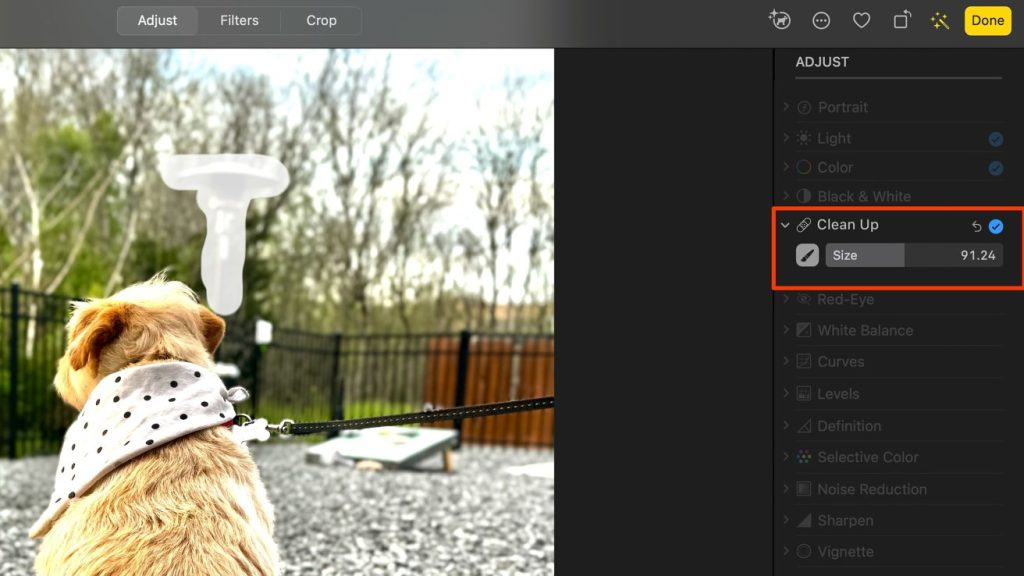
The landscape of photo editing apps is rich and diverse, brimming with options tailored for various skill levels and artistic needs. From Adobe Photoshop Express, which offers comprehensive editing features in a straightforward interface, to lesser-known apps like Fotor that provide a range of templates for quick edits, each app offers a unique experience. By diving deeper into the features of these popular apps, you can better determine which tools align with your creative aspirations effectively.
Conclusion
This exploration of photo editing interfaces aims to illuminate the nuanced factors that can enhance your creative journey. By considering user-friendliness, available tools, and compatibility, you can make informed choices that facilitate not just better edits but also a more enjoyable editing experience. Are you excited to find the right app for your photography needs? Let’s embark on this journey to enhance your visual storytelling!
DON’T MISS: Click here to discover more
Exploring User Experience and Accessibility
When it comes to photo editing, the user experience can significantly influence the overall effectiveness of the app. An interface that is well-designed not only attracts users but also plays a crucial role in their editing efficiency. Understanding the balance between aesthetic appeal and practical usability is key for designers. Popular apps such as Adobe Photoshop Express and Affinity Photo put this principle into practice by prioritizing clear layouts and minimal distractions, allowing users to concentrate on their creative work with ease.
Differentiating Features That Stand Out
Each photo editing application comes equipped with a set of unique features that can either elevate your work or leave you wanting more. Evaluating these differentiators can be essential for selecting the right app for your needs. Here are some notable attributes found in popular photo editing apps:
- Filters and Presets: Apps like VSCO and Snapseed offer a curated collection of filters that can give your images a professional edge with just one click.
- Social Media Integration: If sharing on social media is a priority, apps like Canva streamline the process by allowing you to edit and publish directly to platforms such as Instagram or Facebook.
- AI-Powered Tools: Emerging technologies have paved the way for apps like Prisma, utilizing artificial intelligence to transform photos into stunning works of art in a matter of seconds.
- Collaboration Features: For those working in teams, some apps (such as Adobe Creative Cloud) provide collaborative tools that foster real-time editing and feedback, making project management more efficient.
The Role of Tutorials and Community Support
Another element that can heavily influence a user’s experience is the availability of tutorials and community support. A robust support system can empower users to explore an app’s full potential, ensuring they make the most of its capabilities. Leading platforms often provide tutorials ranging from basic lessons to advanced editing techniques. Moreover, community forums and social groups around these applications offer invaluable advice and inspiration for all skill levels.
User Reviews and Feedback
Analyzing user reviews can provide insights into how an app performs in real-world scenarios. Ratings on platforms such as the Apple App Store or Google Play Store can reflect the reliability and effectiveness of an app’s features. Look for feedback specific to usability, speed, and the quality of built-in tools. Popular apps with high user satisfaction often indicate a well-rounded interface that caters to a broad audience.
Conclusion
With a plethora of photo editing apps available, understanding what makes an interface engaging and effective is essential. By exploring aspects such as user experience, unique features, support communities, and user feedback, you can make a more informed decision that aligns with your creative vision and editing goals. Ready to seek out the app that best fits your needs? Let’s dive into the options to find what might become your new favorite editing tool!
Exploring User-Friendly Features Across Top Photo Editing Apps
The world of photo editing has evolved dramatically, with various applications vying for attention, each boasting unique interfaces and functionalities. Understanding how these interfaces enhance user experience can empower users to maximize their creativity. Below is a summary table that highlights some significant advantages found within popular photo editing apps:
| Category | Key Features |
|---|---|
| Intuitive Interface | Drag and drop features that allow for seamless editing workflows. |
| Advanced Tools | AI-driven filters and adjustment tools that simplify complex edits. |
| Accessibility | Multi-platform support enabling users to edit photos on their preferred devices. |
| Real-time Collaboration | Shared editing features that allow users to work together on projects. |
As seen above, the emphasis on user-friendly interfaces not only enhances the editing experience but also opens up a world of creative possibilities for users of all skill levels. The ability to utilize sophisticated tools without a steep learning curve is a critical asset in today’s digital landscape, where time and efficiency are of the essence.
By exploring these features, users can select the ideal photo editing app that aligns with their needs and artistic vision, ultimately leading to stunning and professionally edited images.
DISCOVER MORE: Click here to dive deeper
Adaptive Interfaces and Innovative Design Trends
With the constant evolution of technology, photo editing interfaces have revolutionized to cater to the changing needs and preferences of users. This shift towards adaptive interfaces has allowed popular apps like Lightroom and PicsArt to optimize user engagement. Adaptive design refers to the app’s ability to alter its layout and functionalities based on the device being used, ensuring a seamless experience whether on a smartphone, tablet, or desktop. This is especially crucial as the demand for mobile-friendly applications continues to grow.
Intuitive Design Elements
Intuitive design elements play a significant role in enhancing user experience by making tools easily accessible and logically organized. Consider the layout of Fotor or BeFunky, where key editing features are prominently displayed, allowing users to navigate effortlessly through functions such as cropping, adjusting brightness, and applying filters. The use of recognizable icons and color-coded tools can further facilitate quick access, reducing the learning curve for first-time users.
Customization and Personalization
Another trend shaping photo editing interfaces is the emphasis on customization and personalization. Many applications now allow users to tailor their workspace according to their preferences. This customization can range from choosing color themes in apps like GIMP to reordering toolbars in Corel PaintShop Pro. Such adaptability not only enhances user satisfaction but also fosters a creative environment where individuals can feel more in control of their editing process.
The Rising Importance of Performance and Speed
Performance and speed remain critical factors in the success of photo editing apps. Users are drawn to platforms that provide quick rendering times and smooth workflows. For instance, Pixlr and Photopea have adopted robust technology that optimizes processing time, allowing users to edit high-resolution images without significant lag. Additionally, functionalities like one-click enhancements and batch processing have become increasingly popular, as they streamline tasks that previously demanded considerable time investment, making photo editing more efficient.
Integration of Emerging Technologies
The integration of emerging technologies such as machine learning and augmented reality is also reshaping how users interact with photo editing applications. Apps like FaceApp and YouCam Makeup leverage AI to analyze images and automatically apply adjustments that enhance portraits or create fun filters. This use of advanced tech not only simplifies the editing process but also introduces features that users may not have considered before, thus pushing the boundaries of creativity.
Community Collaboration and Learning
Finally, the sense of community around photo editing apps cannot be underestimated. Platforms like Adobe Lightroom have established creative communities where users share their edits, techniques, and insights. This collaborative environment fosters learning and inspires users to experiment with new tools and styles. The value of community input reinforces user engagement, making it an integral part of the overall app experience.
DISCOVER MORE: Click here for additional insights
Conclusion: The Future of Photo Editing Interfaces
In a world where visual storytelling reigns supreme, the best photo editing interfaces in popular apps are more than just tools; they are gateways to creativity. As we explored, the evolution of design has led to a remarkable convergence of adaptive interfaces, intuitive layouts, and enhanced customization options that cater to a diverse array of user needs. The trend towards personalization not only empowers users but also fosters an environment ripe for innovation and self-expression.
The integration of emerging technologies continues to reshape these interfaces, with AI and machine learning paving the way for smarter, more efficient editing processes. This tech-savvy shift simplifies tasks that once required extensive expertise, inviting even novices to partake in the art of photo editing. Moreover, the community aspect surrounding these applications encourages collaboration, allowing users to learn from one another and refine their skills.
As we look ahead, the landscape of photo editing is set to become increasingly dynamic. Users will demand more from their tools—speed, performance, and innovative features. Developers will rise to the occasion, continuously improving functionality to meet the high expectations of creative minds. In essence, the journey of discovering the best photo editing interfaces is ongoing, and as technology advances, there will always be new horizons for users to explore. Whether you are a seasoned professional or a curious beginner, the world of photo editing is yours to unlock, one app at a time.
Related posts:
Improving the User Experience: App Interfaces to Save Money
The Evolution of Interfaces in Photo Editing Apps: Trends and Features
Interface Design: The Impact of Fitness Applications on User Motivation
Improving the User Experience: App Interfaces for Learning Languages and Saving Money
How App Interfaces for Economy Facilitate Personal Financial Management
Intuitive Interfaces: How Language Learning and Fitness Apps Boost Daily Productivity

Beatriz Johnson is a seasoned digital lifestyle strategist and green tech writer with a passion for demystifying sustainable technology and eco-conscious living. With over a decade of experience at the intersection of innovation and sustainability, she specializes in topics like smart home solutions, renewable tech applications, and global trends in green digitalization. Through her work on our platform, Beatriz empowers readers to make informed choices about adopting planet-friendly technologies while optimizing their digital lives for both efficiency and environmental impact.